
curve元素0.13.0起可用
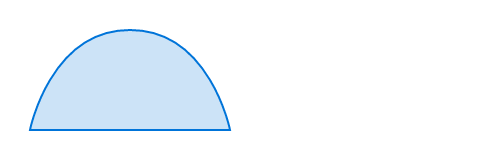
A curve consisting of movements, lines, and Bézier segments.
At any point in time, there is a conceptual pen or cursor.
- Move elements move the cursor without drawing.
- Line/Quadratic/Cubic elements draw a segment from the cursor to a new position, potentially with control point for a Bézier curve.
- Close elements draw a straight or smooth line back to the start of the curve or the latest preceding move segment.
For layout purposes, the bounding box of the curve is a tight rectangle containing all segments as well as the point (0pt, 0pt).
Positions may be specified absolutely (i.e. relatively to (0pt, 0pt)), or relative to the current pen/cursor position, that is, the position where the previous segment ended.
Bézier curve control points can be skipped by passing none or automatically mirrored from the preceding segment by passing auto.
Example
#curve(
fill: blue.lighten(80%),
stroke: blue,
curve.move((0pt, 50pt)),
curve.line((100pt, 50pt)),
curve.cubic(none, (90pt, 0pt), (50pt, 0pt)),
curve.close(),
)
参数
fill默认值:none
How to fill the curve.
When setting a fill, the default stroke disappears. To create a curve with both fill and stroke, you have to configure both.
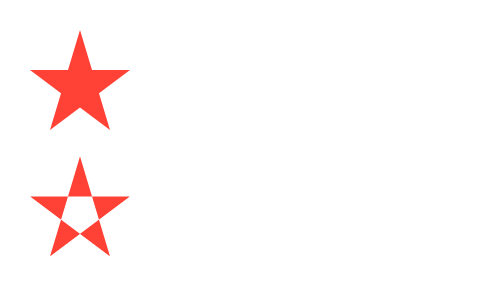
fill-rule默认值:"non-zero"
The drawing rule used to fill the curve.
 展开示例
展开示例
// We use `.with` to get a new
// function that has the common
// arguments pre-applied.
#let star = curve.with(
fill: red,
curve.move((25pt, 0pt)),
curve.line((10pt, 50pt)),
curve.line((50pt, 20pt)),
curve.line((0pt, 20pt)),
curve.line((40pt, 50pt)),
curve.close(),
)
#star(fill-rule: "non-zero")
#star(fill-rule: "even-odd")
| Variant | Details |
|---|---|
"non-zero" | Specifies that “inside” is computed by a non-zero sum of signed edge crossings. |
"even-odd" | Specifies that “inside” is computed by an odd number of edge crossings. |
stroke默认值:auto
How to stroke the curve.
Can be set to none to disable the stroke or to auto for a stroke of 1pt black if and only if no fill is given.
展开示例
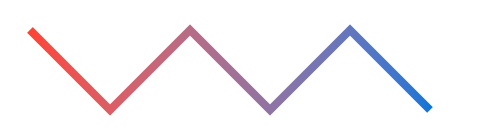
#let down = curve.line((40pt, 40pt), relative: true)
#let up = curve.line((40pt, -40pt), relative: true)
#curve(
stroke: 4pt + gradient.linear(red, blue),
down, up, down, up, down,
)
components
The components of the curve, in the form of moves, line and Bézier segment, and closes.
定义
move元素0.13.0起可用
Starts a new curve component.
If no curve.move element is passed, the curve will start at (0pt, 0pt).
展开示例
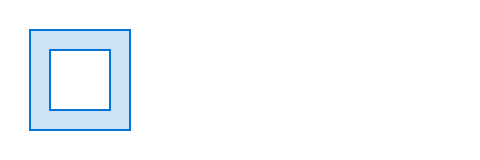
#curve(
fill: blue.lighten(80%),
fill-rule: "even-odd",
stroke: blue,
curve.line((50pt, 0pt)),
curve.line((50pt, 50pt)),
curve.line((0pt, 50pt)),
curve.close(),
curve.move((10pt, 10pt)),
curve.line((40pt, 10pt)),
curve.line((40pt, 40pt)),
curve.line((10pt, 40pt)),
curve.close(),
)
start
The starting point for the new component.
relative默认值:false
Whether the coordinates are relative to the previous point.
line元素0.13.0起可用
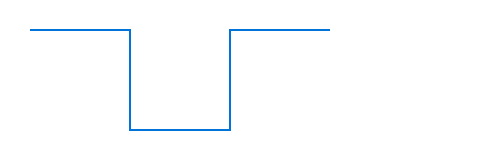
Adds a straight line from the current point to a following one.
展开示例
#curve(
stroke: blue,
curve.line((50pt, 0pt)),
curve.line((50pt, 50pt)),
curve.line((100pt, 50pt)),
curve.line((100pt, 0pt)),
curve.line((150pt, 0pt)),
)
end
The point at which the line shall end.
relative默认值:false
Whether the coordinates are relative to the previous point.
展开示例
#curve(
stroke: blue,
curve.line((50pt, 0pt), relative: true),
curve.line((0pt, 50pt), relative: true),
curve.line((50pt, 0pt), relative: true),
curve.line((0pt, -50pt), relative: true),
curve.line((50pt, 0pt), relative: true),
)
quad元素0.13.0起可用
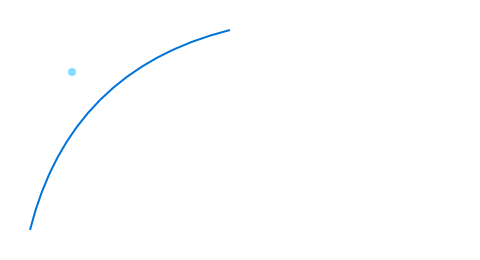
Adds a quadratic Bézier curve segment from the last point to end, using control as the control point.
展开示例
// Function to illustrate where the control point is.
#let mark((x, y)) = place(
dx: x - 1pt, dy: y - 1pt,
circle(fill: aqua, radius: 2pt),
)
#mark((20pt, 20pt))
#curve(
stroke: blue,
curve.move((0pt, 100pt)),
curve.quad((20pt, 20pt), (100pt, 0pt)),
)
control
The control point of the quadratic Bézier curve.
- If
autoand this segment follows another quadratic Bézier curve, the previous control point will be mirrored. - If
none, the control point defaults toend, and the curve will be a straight line.
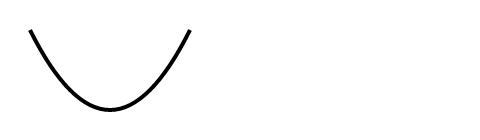
展开示例
#curve(
stroke: 2pt,
curve.quad((20pt, 40pt), (40pt, 40pt), relative: true),
curve.quad(auto, (40pt, -40pt), relative: true),
)
end
The point at which the segment shall end.
relative默认值:false
Whether the control and end coordinates are relative to the previous point.
cubic元素0.13.0起可用
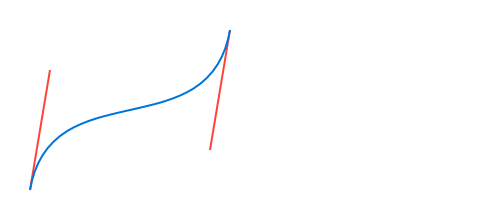
Adds a cubic Bézier curve segment from the last point to end, using control-start and control-end as the control points.
展开示例
// Function to illustrate where the control points are.
#let handle(start, end) = place(
line(stroke: red, start: start, end: end)
)
#handle((0pt, 80pt), (10pt, 20pt))
#handle((90pt, 60pt), (100pt, 0pt))
#curve(
stroke: blue,
curve.move((0pt, 80pt)),
curve.cubic((10pt, 20pt), (90pt, 60pt), (100pt, 0pt)),
)
control-start
The control point going out from the start of the curve segment.
If
autoand this element follows anothercurve.cubicelement, the last control point will be mirrored. In SVG terms, this makescurve.cubicbehave like theSoperator instead of theCoperator.If
none, the curve has no first control point, or equivalently, the control point defaults to the curve’s starting point.
展开示例
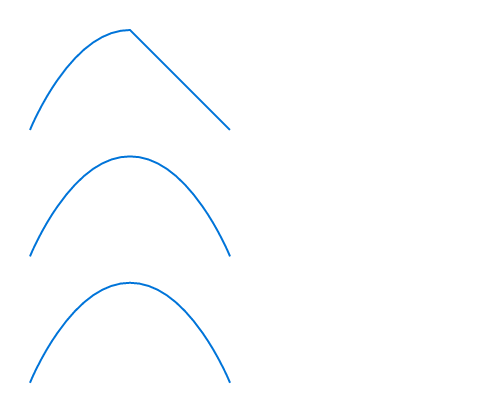
#curve(
stroke: blue,
curve.move((0pt, 50pt)),
// - No start control point
// - End control point at `(20pt, 0pt)`
// - End point at `(50pt, 0pt)`
curve.cubic(none, (20pt, 0pt), (50pt, 0pt)),
// - No start control point
// - No end control point
// - End point at `(50pt, 0pt)`
curve.cubic(none, none, (100pt, 50pt)),
)
#curve(
stroke: blue,
curve.move((0pt, 50pt)),
curve.cubic(none, (20pt, 0pt), (50pt, 0pt)),
// Passing `auto` instead of `none` means the start control point
// mirrors the end control point of the previous curve. Mirror of
// `(20pt, 0pt)` w.r.t `(50pt, 0pt)` is `(80pt, 0pt)`.
curve.cubic(auto, none, (100pt, 50pt)),
)
#curve(
stroke: blue,
curve.move((0pt, 50pt)),
curve.cubic(none, (20pt, 0pt), (50pt, 0pt)),
// `(80pt, 0pt)` is the same as `auto` in this case.
curve.cubic((80pt, 0pt), none, (100pt, 50pt)),
)
control-end
The control point going into the end point of the curve segment.
If set to none, the curve has no end control point, or equivalently, the control point defaults to the curve’s end point.
end
The point at which the curve segment shall end.
relative默认值:false
Whether the control-start, control-end, and end coordinates are relative to the previous point.
close元素0.13.0起可用
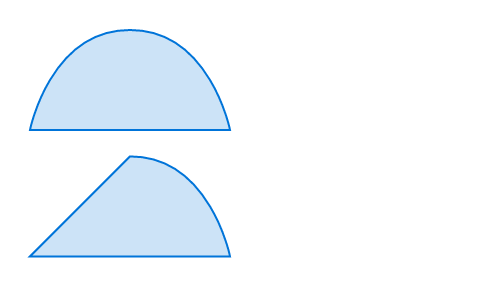
Closes the curve by adding a segment from the last point to the start of the curve (or the last preceding curve.move point).
展开示例
// We define a function to show the same shape with
// both closing modes.
#let shape(mode: "smooth") = curve(
fill: blue.lighten(80%),
stroke: blue,
curve.move((0pt, 50pt)),
curve.line((100pt, 50pt)),
curve.cubic(auto, (90pt, 0pt), (50pt, 0pt)),
curve.close(mode: mode),
)
#shape(mode: "smooth")
#shape(mode: "straight")
mode默认值:"smooth"
How to close the curve.
| Variant | Details |
|---|---|
"smooth" | Closes the curve with a smooth segment that takes into account the control point opposite the start point. |
"straight" | Closes the curve with a straight line. |