

语法
Typst是一种标记语言。这意味着,使用简单的语法就可以进行常用的布局操作,再辅以set和show规则,格式化文档更加简单,更加自动化,这些均是基于紧密集成在Typst内的脚本语言,其内置大量常用函数,用户亦可根据需求自定义函数。 [⚠️]
Modes
Typst has three syntactical modes: Markup, math, and code. Markup mode is the default in a Typst document, math mode lets you write mathematical formulas, and code mode lets you use Typst’s scripting features.
You can switch to a specific mode at any point by referring to the following table:
| New mode | Syntax | Example |
|---|---|---|
| Code | Prefix the code with # | Number: #(1 + 2) |
| Math | Surround equation with $..$ | $-x$ is the opposite of $x$ |
| Markup | Surround markup with [..] | let name = [*Typst!*] |
Once you have entered code mode with #, you don’t need to use further hashes unless you switched back to markup or math mode in between.
标记模式
Typst为常用文档元素内置了语法标记。这些语法标记大多只是相关函数的快捷表达方式,下表列出了所有语法标记,以及它们的详细使用的链接地址。 [⚠️]
| 名称 | 示例 | 详情链接 |
|---|---|---|
| 段落中断[⚠️] | 空行 | parbreak |
| 着重强调[⚠️] | *strong* | strong |
| 强调[⚠️] | _emphasis_ | emph |
| 代码段[⚠️] | `print(1)` | raw |
| 链接 | https://typst.app/ | link |
| 标签 | <intro> | label |
| 交叉引用 | @intro | ref |
| 章节标题 | = Heading | heading |
| 项目符号列表 | - item | list |
| 编号列表 | + item | enum |
| 术语列表 | / Term: description | terms |
| 数学公式 | $x^2$ | Math |
| 行中断[⚠️] | \ | linebreak |
| 智能引号 | 'single' or "double" | smartquote |
| 快捷符号[⚠️] | ~, --- | Symbols |
| 代码表达式[⚠️] | #rect(width: 1cm) | Scripting |
| 转义字符 | Tweet at us \#ad | Below |
| 注释 | /* block */, // line | Below |
数学模式
数学模式是一种特殊的语法标记模式,专门用来输入数学公式。通过$字符包裹一个数学公式,如果这个公式头尾都至少一个空格(例如$ x^2 $),这个公式将会形成一个文档块,单独占用一行,如果头尾没有空格(例如$x^2$),这个公式将会排版在行内,下面是针对数学模式的语法概述: [⚠️]
| 名称 | 示例 | 详情链接 |
|---|---|---|
| 行内公式 | $x^2$ | Math |
| 独行公式 | $ x^2 $ | Math |
| 下标 | $x_1$ | attach |
| 上标 | $x^2$ | attach |
| 分数 | $1 + (a+b)/5$ | frac |
| 行中断[⚠️] | $x \ y$ | linebreak |
| 对齐点[⚠️] | $x &= 2 \ &= 3$ | Math |
| 变量访问[⚠️] | $#x$, $pi$ | Math |
| 字段访问[⚠️] | $arrow.r.long$ | Scripting |
| 隐式表达的乘积 | $x y$ | Math |
| 快捷符号[⚠️] | $->$, $!=$ | Symbols |
| 数学公式内字符串[⚠️] | $a "is natural"$ | Math |
| 数学函数调用[⚠️] | $floor(x)$ | Math |
| 代码表达式[⚠️] | $#rect(width: 1cm)$ | Scripting |
| 转义字符[⚠️] | $x\^2$ | Below |
| 注释 | $/* comment */$ | Below |
脚本模式
在代码块和表达式中,新的表达式不再前缀#字符。许多代码语法元素是表达式特有的,下面列出了代码模式下所有可用的语法: [⚠️]
| 名称 | 示例 | 详情链接 |
|---|---|---|
| None | none | none |
| Auto | auto | auto |
| Boolean | false, true | bool |
| Integer | 10, 0xff | int |
| Floating-point number | 3.14, 1e5 | float |
| Length | 2pt, 3mm, 1em, .. | length |
| Angle | 90deg, 1rad | angle |
| Fraction | 2fr | fraction |
| Ratio | 50% | ratio |
| String | "hello" | str |
| Label | <intro> | label |
| Math | $x^2$ | Math |
| Raw text | `print(1)` | raw |
| 变量访问[⚠️] | x | Scripting |
| 代码块[⚠️] | { let x = 1; x + 2 } | Scripting |
| 文档内容块[⚠️] | [*Hello*] | Scripting |
| 括号表达式[⚠️] | (1 + 2) | Scripting |
| 数组[⚠️] | (1, 2, 3) | Array |
| 字典[⚠️] | (a: "hi", b: 2) | Dictionary |
| 一元运算符[⚠️] | -x | Scripting |
| 二元运算符[⚠️] | x + y | Scripting |
| 赋值[⚠️] | x = 1 | Scripting |
| 字段访问[⚠️] | x.y | Scripting |
| 方法调用[⚠️] | x.flatten() | Scripting |
| 函数调用[⚠️] | min(x, y) | Function |
| Argument spreading | min(..nums) | Arguments |
| 匿名函数[⚠️] | (x, y) => x + y | Function |
| let绑定[⚠️] | let x = 1 | Scripting |
| 命名函数[⚠️] | let f(x) = 2 * x | Function |
| set规则 | set text(14pt) | Styling |
| set-if规则 | set text(..) if .. | Styling |
| show-set规则 | show heading: set block(..) | Styling |
| 函数式show规则[⚠️] | show raw: it => {..} | Styling |
| show-everything 规则[⚠️] | show: template | Styling |
| Context expression | context text.lang | Context |
| 条件表语句[⚠️] | if x == 1 {..} else {..} | Scripting |
| for循环[⚠️] | for x in (1, 2, 3) {..} | Scripting |
| while循环[⚠️] | while x < 10 {..} | Scripting |
| 循环流程控制[⚠️] | break, continue | Scripting |
| 函数返回[⚠️] | return x | Function |
| include模块[⚠️] | include "bar.typ" | Scripting |
| import模块[⚠️] | import "bar.typ" | Scripting |
| 从模块内import条目[⚠️] | import "bar.typ": a, b, c | Scripting |
| 注释 | /* block */, // line | Below |
注释
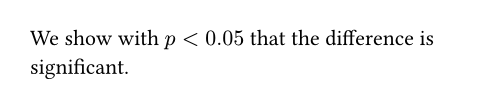
Typst会忽略注释,最终生成的文档不会包含它们。它们通常被用于剔除旧版本,或者添加标注说明。如果一行开头是//,这行就会被认为是注释: [⚠️]
// our data barely supports
// this claim
We show with $p < 0.05$
that the difference is
significant.
babel(en: ) 也可以通过/*和*/来包裹注释,这种方式,注释可以分布于多行: [⚠️]
Our study design is as follows:
/* Somebody write this up:
- 1000 participants.
- 2x2 data design. */

转义序列
转义序列可以用来插入难于输入的特殊字符,或者Typst内有特殊含义的字符。前缀一个反斜杠转义一个字符,转移序列如果是十六进制,比如\u{1f600},就会插入一个Unicode码点。这些类型的转义序列也作用于字符串中。 [⚠️]
I got an ice cream for
\$1.50! \u{1f600}

Identifiers
Names of variables, functions, and so on (identifiers) can contain letters, numbers, hyphens (-), and underscores (_). They must start with a letter or an underscore.
More specifically, the identifier syntax in Typst is based on the Unicode Standard Annex #31, with two extensions: Allowing _ as a starting character, and allowing both _ and - as continuing characters.
For multi-word identifiers, the recommended case convention is Kebab case. In Kebab case, words are written in lowercase and separated by hyphens (as in top-edge). This is especially relevant when developing modules and packages for others to use, as it keeps things predictable.
#let kebab-case = [Using hyphen]
#let _schön = "😊"
#let 始料不及 = "😱"
#let π = calc.pi
#kebab-case
#if -π < 0 { _schön } else { 始料不及 }
// -π means -1 * π,
// so it's not a valid identifier
