
measure上下文相关函数自始可用
Measures the layouted size of content.
The measure function lets you determine the layouted size of content. By default an infinite space is assumed, so the measured dimensions may not necessarily match the final dimensions of the content. If you want to measure in the current layout dimensions, you can combine measure and layout.
Example
The same content can have a different size depending on the context that it is placed into. In the example below, the #content is of course bigger when we increase the font size.
#let content = [Hello!]
#content
#set text(14pt)
#content

For this reason, you can only measure when context is available.
#let thing(body) = context {
let size = measure(body)
[Width of "#body" is #size.width]
}
#thing[Hey] \
#thing[Welcome]
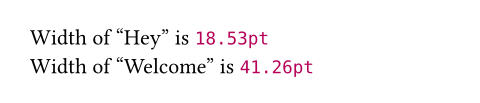
The measure function returns a dictionary with the entries width and height, both of type length.
参数
width默认值:auto
The width available to layout the content.
Setting this to auto indicates infinite available width.
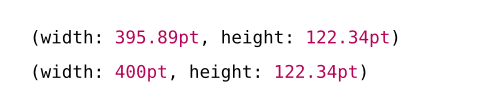
Note that using the width and height parameters of this function is different from measuring a sized block containing the content. In the following example, the former will get the dimensions of the inner content instead of the dimensions of the block.
 展开示例
展开示例
#context measure(lorem(100), width: 400pt)
#context measure(block(lorem(100), width: 400pt))
height默认值:auto
The height available to layout the content.
Setting this to auto indicates infinite available height.
content
The content whose size to measure.