

header-cell0.14.0起可用Requires the a11y-extras feature
Explicitly defines a cell as a header cell.
Header cells help users of Assistive Technology (AT) understand and navigate complex tables. When your table is correctly marked up with header cells, AT can announce the relevant header information on-demand when entering a cell.
By default, Typst will automatically mark all cells within table.header as header cells. They will apply to the columns below them. You can use that function’s level parameter to make header cells labelled by other header cells.
The pdf.header-cell function allows you to indicate that a cell is a header cell in the following additional situations:
- You have a header column in which each cell applies to its row. In that case, you pass
"row"as an argument to thescopeparameter to indicate that the header cell applies to the row. - You have a cell in
table.header, for example at the very start, that labels both its row and column. In that case, you pass"both"as an argument to thescopeparameter. - You have a header cell in a row not containing other header cells. In that case, you can use this function to mark it as a header cell.
The API of this feature is temporary. Hence, calling this function requires enabling the a11y-extras feature flag at the moment. In a future Typst release, this functionality may move out of the pdf module so that tables in other export targets can contain the same information.
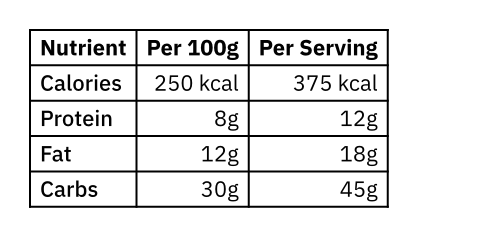
#show table.cell.where(x: 0): set text(weight: "medium")
#show table.cell.where(y: 0): set text(weight: "bold")
#table(
columns: 3,
align: (start, end, end),
table.header(
// Top-left cell: Labels both the nutrient rows
// and the serving size columns.
pdf.header-cell(scope: "both")[Nutrient],
[Per 100g],
[Per Serving],
),
// First column cells are row headers
pdf.header-cell(scope: "row")[Calories],
[250 kcal], [375 kcal],
pdf.header-cell(scope: "row")[Protein],
[8g], [12g],
pdf.header-cell(scope: "row")[Fat],
[12g], [18g],
pdf.header-cell(scope: "row")[Carbs],
[30g], [45g],
)
参数
level默认值:1
The nesting level of this header cell.
scope默认值:"column"
What track of the table this header cell applies to.
| Variant | Details |
|---|---|
"both" | The header cell refers to both the row and the column. |
"column" | The header cell refers to the column. |
"row" | The header cell refers to the row. |
cell
The table cell.
This can be content or a call to table.cell.