
raw元素自始可用
原始文本,可选语法高亮。
以等宽字体显示文本。通常用于将计算机代码嵌入到文档中。 [⚠️]
Example
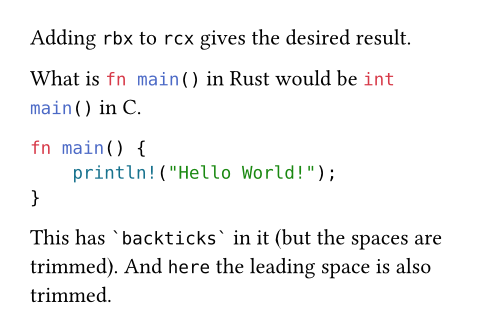
Adding `rbx` to `rcx` gives
the desired result.
What is ```rust fn main()``` in Rust
would be ```c int main()``` in C.
```rust
fn main() {
println!("Hello World!");
}
```
This has ``` `backticks` ``` in it
(but the spaces are trimmed). And
``` here``` the leading space is
also trimmed.
您还可以从字符串构造一个raw元素(并提供语言标签,通过可选的lang参数)。 [⚠️]
#raw("fn " + "main() {}", lang: "rust")

If no syntax highlighting is available by default for your specified language tag (or if you want to override the built-in definition), you may provide a custom syntax specification file to the syntaxes parameter.
Styling
By default, the raw element uses the DejaVu Sans Mono font (included with Typst), with a smaller font size of 0.8em (that is, 80% of the global font size). This is because monospace fonts tend to be visually larger than non-monospace fonts.
You can customize these properties with show-set rules:
// Switch to Cascadia Code for both
// inline and block raw.
#show raw: set text(font: "Cascadia Code")
// Reset raw blocks to the same size as normal text,
// but keep inline raw at the reduced size.
#show raw.where(block: true): set text(1em / 0.8)
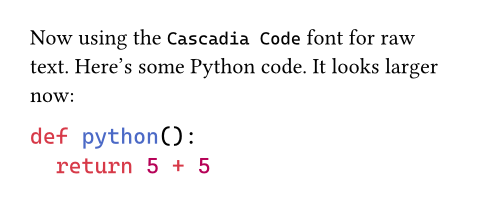
Now using the `Cascadia Code` font for raw text.
Here's some Python code. It looks larger now:
```py
def python():
return 5 + 5
```
In addition, you can customize the syntax highlighting colors by setting a custom theme through the theme parameter.
For complete customization of the appearance of a raw block, a show rule on raw.line could be helpful, such as to add line numbers.
Note that in raw text, typesetting features like hyphenation, overhang, CJK-Latin spacing, and (for raw blocks) justification will be disabled by default.
语法
This function has dedicated syntax that produces a raw element in both markup and code mode. You can enclose text in one or three-plus backtick characters (`) on both sides to make it raw. The number of backticks must be the same on both sides, and the enclosed text cannot contain a group of that many backticks in a row. Writing just two backticks (``) produces empty raw text.
Notable differences from Markdown include that single backticks can enclose text spanning multiple lines without removing indentation, and that the three-plus backtick syntax still interprets language tags when used inline.
Raw text enclosed in single backticks has no way to specify a language tag and is always treated as inline for use within a paragraph, i.e. the block parameter is false.
Raw syntax using three or more backticks has the following properties:
After the initial backticks, the raw block is only terminated by a sequence of the same number of backticks
To include text containing a sequence of backticks, the initial and final backticks must have at least one more backtick than the sequence.
If the raw text contains a linebreak, it will be block-level, otherwise it will be inline
This sets the
blockparameter totrueorfalseaccordingly.Text immediately after the initial backticks, up to the first whitespace, is treated as a language tag used for syntax highlighting
The specific rules for which text can be treated as the language tag are planned to change, and are explained in detail below.
The initial and final lines have special trimming behavior
For the initial line, if all characters following the initial backticks or language tag are whitespace, the entire line will be trimmed. However, if there are non-whitespace characters on that line, only a single space immediately following the initial backticks or language tag will be trimmed if present.
If the final line is entirely whitespace up to the closing backticks, it will be trimmed. Otherwise, if the last non-whitespace character of the final line is a backtick, then one space character will be trimmed from the end of the line if present.
Common indentation at the beginning of lines is trimmed
Typst will remove initial whitespace at the beginning of lines in the raw text that is shared between all lines, i.e. common indentation. Although this excludes text on the line with the initial backticks.
Typst first finds the line with the fewest initial whitespace characters that contains some non-whitespace characters, including the line with the closing backticks. Then Typst trims characters from every line equal to the number of initial whitespace characters in that line. Lines which are only whitespace will remove the same number of characters until they are empty, but will keep any extra trailing whitespace.
Note that this check treats tabs and spaces as equivalent characters for simplicity, and that it operates on numbers of Unicode code points, i.e. characters, not on byte lengths.
These properties of the three-plus backtick syntax allow for some use cases that may not be obvious:
To write text containing a sequence of backticks, enclose it with one or more backticks than the sequence:
```` enclosed```backticks````To write text that starts or ends with a backtick, add a space inside the opening and closing backticks:
``` `backticks` ```To write inline text highlighted with a language tag, add a space between the language tag and the text
```rust fn main() {}```To write inline text without any language tag, add a space after the initial backticks:
``` text```or use the single backtick syntax:`text`
Embedding strings with raw syntax
A common use-case for raw syntax is to embed data as strings with formatting by accessing the .text field on raw content to get the underlying string. This may also be paired with the bytes constructor to convert the string to bytes.
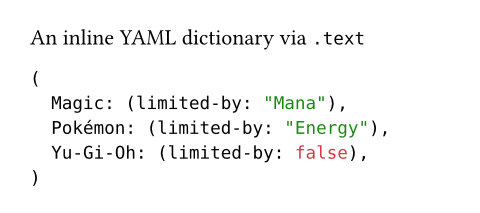
An inline YAML dictionary via `.text`
#yaml(bytes(
```yaml
Magic:
limited-by: Mana
Pokémon:
limited-by: Energy
Yu-Gi-Oh:
limited-by: false
```.text
// ^^^^ used as a string
))
Language tag changes
When using raw syntax with three or more backticks, text immediately after the initial backticks (up to the first whitespace) is treated as a language tag. However in the current version of Typst, only text that would be a valid Typst identifier is treated as the language tag. The first character not valid for an identifier will be interpreted as starting the raw text.
For example, in the current version of Typst, if a raw block starts with C++, the identifier C will be the language tag, and the raw text will start with ++. If a raw block starts with ++C, it will have no language tag and the raw text will start with ++C.
To use language tags that are not valid as identifiers in the current version of Typst, you must use the lang parameter, either by calling the constructor with a string: #raw("text", lang: "..."), or by writing a set rule: #set raw(lang: "...").
In the next version of Typst, all text up to the first whitespace or backtick will be treated as the language tag, allowing a wider character set for language tags. Tags including spaces or backticks will still need to be set manually via the lang parameter.
Typst will alert you if your raw blocks will be interpreted differently in the next Typst version by emitting a warning.
参数
text
原始文本。
您还可以创意地使用原始块来为您的自动化创建自定义语法。 [⚠️]
 展开示例:Implementing a DSL using raw and show rules
// Parse numbers in raw blocks with the
// `mydsl` tag and sum them up.
#show raw.where(lang: "mydsl"): it => {
let sum = 0
for part in it.text.split("+") {
sum += int(part.trim())
}
sum
}
```mydsl
1 + 2 + 3 + 4 + 5
```

block默认值:false
原始文本是否作为单独的块显示。
在标记模式中,使用一个反斜杠表示法会使其false。使用三个反斜杠表示法,如果封闭内容包含至少一个换行符,则使其true。 [⚠️]
展开示例
// Display inline code in a small box
// that retains the correct baseline.
#show raw.where(block: false): box.with(
fill: luma(240),
inset: (x: 3pt, y: 0pt),
outset: (y: 3pt),
radius: 2pt,
)
// Display block code in a larger block
// with more padding.
#show raw.where(block: true): block.with(
fill: luma(240),
inset: 10pt,
radius: 4pt,
)
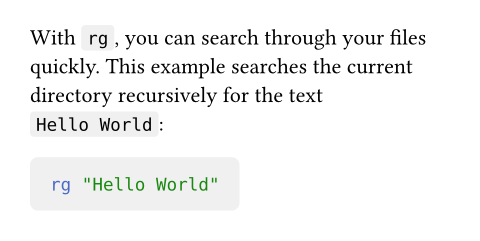
With `rg`, you can search through your files quickly.
This example searches the current directory recursively
for the text `Hello World`:
```bash
rg "Hello World"
```
lang默认值:none
要进行语法高亮的语言。
除了典型的Markdown语言标签外,还支持"typ"、"typc"和"typm" 标签,分别用于Typst标记、Typst脚本和Typst数学公式。 [⚠️]
Available syntaxes
| Name | Tags |
|---|---|
| Typst | typ, typst |
| Typst (code) | typc |
| Typst (math) | typm |
| ActionScript | as |
| Ada | adb, ads, gpr |
| Apache Conf | envvars, htaccess, HTACCESS, htgroups, HTGROUPS, htpasswd, HTPASSWD, .htaccess, .HTACCESS, .htgroups, .HTGROUPS, .htpasswd, .HTPASSWD |
| AppleScript | applescript, script editor |
| AsciiDoc (Asciidoctor) | adoc, ad, asciidoc |
| ASP | asa |
| Assembly (x86_64) | yasm, nasm, asm, inc, mac |
| Authorized Keys | authorized_keys, pub, authorized_keys2 |
| AWK | awk |
| Batch File | bat, cmd |
| BibTeX | bib |
| Bourne Again Shell (bash) | sh, bash, zsh, ash, .bash_aliases, .bash_completions, .bash_functions, .bash_login, .bash_logout, .bash_profile, .bash_variables, .bashrc, .profile, .textmate_init, .zlogin, .zlogout, .zprofile, .zshenv, .zshrc, PKGBUILD, ebuild, eclass |
| C | c, h |
| C# | cs, csx |
| C++ | cpp, cc, cp, cxx, c++, C, h, hh, hpp, hxx, h++, inl, ipp |
| Cabal | cabal |
| CFML | cfml, cfm, cfc |
| Clojure | clj, cljc, cljs, edn |
| CMake | CMakeLists.txt, cmake |
| CMake C Header | h.in |
| CMake C++ Header | hh.in, hpp.in, hxx.in, h++.in |
| CMakeCache | CMakeCache.txt |
| CoffeeScript | coffee, Cakefile, coffee.erb, cson |
| Comma Separated Values | csv, tsv |
| CpuInfo | cpuinfo |
| Crontab | tab, crontab, cron.d |
| Crystal | cr |
| CSS | css, css.erb, css.liquid |
| D | d, di |
| Dart | dart |
| Diff | diff, patch |
| Dockerfile | Dockerfile, dockerfile, .Dockerfile |
| DotENV | .env, .env.dist, .env.local, .env.sample, .env.example, .env.template, .env.test, .env.test.local, .env.testing, .env.dev, .env.development, .env.development.local, .env.prod, .env.production, .env.production.local, .env.dusk.local, .env.staging, .env.default, .env.defaults, .envrc, .flaskenv, env, env.example, env.sample, env.template |
| Elixir | ex, exs |
| Elm | elm |
eml, msg, mbx, mboxz | |
| Erlang | erl, hrl, Emakefile, emakefile, escript |
| F# | fs, fsi, fsx |
| Fish | fish |
| Fortran (Fixed Form) | f, F, f77, F77, for, FOR, fpp, FPP |
| Fortran (Modern) | f90, F90, f95, F95, f03, F03, f08, F08 |
| Fortran Namelist | namelist |
| fstab | fstab, crypttab, mtab |
| Git Attributes | attributes, gitattributes, .gitattributes |
| Git Commit | COMMIT_EDITMSG, MERGE_MSG, TAG_EDITMSG |
| Git Config | gitconfig, .gitconfig, .gitmodules |
| Git Ignore | exclude, gitignore, .gitignore |
| Git Link | .git |
| Git Log | gitlog |
| Git Mailmap | .mailmap, mailmap |
| Git Rebase Todo | git-rebase-todo |
| GLSL | vs, fs, gs, vsh, fsh, gsh, vshader, fshader, gshader, vert, frag, geom, tesc, tese, comp, glsl, mesh, task, rgen, rint, rahit, rchit, rmiss, rcall |
| gnuplot | gp, gpl, gnuplot, gnu, plot, plt |
| Go | go |
| GraphQL | graphql, graphqls, gql |
| Graphviz (DOT) | dot, DOT, gv |
| Groff/troff | groff, troff, 1, 2, 3, 4, 5, 6, 7, 8, 9 |
| Groovy | groovy, gvy, gradle, Jenkinsfile |
| group | group |
| Haskell | hs |
| Highlight non-printables | show-nonprintable |
| hosts | hosts |
| HTML | html, htm, shtml, xhtml |
| HTML (ASP) | asp |
| HTML (EEx) | html.eex, html.leex |
| HTML (Erlang) | yaws |
| HTML (Jinja2) | htm.j2, html.j2, xhtml.j2, xml.j2 |
| HTML (Rails) | rails, rhtml, erb, html.erb |
| HTML (Tcl) | adp |
| HTML (Twig) | twig, html.twig |
| HTTP Request and Response | http |
| INI | ini, INI, inf, INF, reg, REG, lng, cfg, CFG, desktop, url, URL, .editorconfig, .coveragerc, .pylintrc, .gitlint, .hgrc, hgrc |
| Java | java, bsh |
| Java Properties | properties |
| Java Server Page (JSP) | jsp |
| JavaScript | js, htc |
| JavaScript (Rails) | js.erb |
| Jinja2 | j2, jinja2, jinja |
| JQ | jq |
| JSON | json, sublime-settings, sublime-menu, sublime-keymap, sublime-mousemap, sublime-theme, sublime-build, sublime-project, sublime-completions, sublime-commands, sublime-macro, sublime-color-scheme, ipynb, Pipfile.lock |
| JSON (Terraform) | tfstate |
| jsonnet | jsonnet, libsonnet, libjsonnet |
| Julia | jl |
| Known Hosts | known_hosts, known_hosts.old |
| Kotlin | kt, kts |
| LaTeX | tex, ltx |
| Lean | lean |
| Less | less, css.less |
| Lisp | lisp, cl, clisp, l, mud, el, scm, ss, lsp, fasl, sld |
| Literate Haskell | lhs |
| LLVM | ll |
| log | log |
| Lua | lua |
| Makefile | make, GNUmakefile, makefile, Makefile, makefile.am, Makefile.am, makefile.in, Makefile.in, OCamlMakefile, mak, mk |
| Manpage | man |
| Markdown | md, mdown, markdown, markdn |
| MATLAB | matlab |
| MediaWiki | mediawiki, wikipedia, wiki |
| MemInfo | meminfo |
| NAnt Build File | build |
| nginx | conf.erb, conf, nginx.conf, mime.types, fastcgi_params, scgi_params, uwsgi_params |
| Nim | nim, nims, nimble |
| Ninja | ninja |
| Nix | nix |
| NSIS | nsi, nsh, bnsi, bnsh, nsdinc |
| Objective-C | m, h |
| Objective-C++ | mm, M, h |
| OCaml | ml, mli |
| OCamllex | mll |
| OCamlyacc | mly |
| orgmode | org |
| Pascal | pas, p, dpr |
| passwd | passwd |
| Perl | pl, pc, pm, pmc, pod, t |
| PHP | php, php3, php4, php5, php7, phps, phpt, phtml |
| Plain Text | txt |
| Protocol Buffer | proto, protobuf, protodevel |
| Protocol Buffer (TEXT) | pb.txt, proto.text, textpb, pbtxt, prototxt, textproto |
| Puppet | pp, epp |
| PureScript | purs |
| Python | py, py3, pyw, pyi, pyx, pyx.in, pxd, pxd.in, pxi, pxi.in, rpy, cpy, SConstruct, Sconstruct, sconstruct, SConscript, gyp, gypi, Snakefile, vpy, wscript, bazel, bzl |
| QML | qml, qmlproject |
| R | R, r, Rprofile |
| Racket | rkt |
| Rd (R Documentation) | rd |
| Rego | rego |
| Regular Expression | re |
| Requirements.txt | requirements.txt, requirements.in, pip |
| resolv | resolv.conf |
| reStructuredText | rst, rest |
| Robot Framework | robot, resource |
| Ruby | rb, Appfile, Appraisals, Berksfile, Brewfile, capfile, cgi, Cheffile, config.ru, Deliverfile, Fastfile, fcgi, Gemfile, gemspec, Guardfile, irbrc, jbuilder, Podfile, podspec, prawn, rabl, rake, Rakefile, Rantfile, rbx, rjs, ruby.rail, Scanfile, simplecov, Snapfile, thor, Thorfile, Vagrantfile |
| Ruby Haml | haml, sass |
| Ruby on Rails | rxml, builder |
| Ruby Slim | slim, skim |
| Rust | rs |
| Scala | scala, sbt, sc |
| SCSS | scss |
| SML | sml, cm, sig |
| Solidity | sol |
| SQL | sql, ddl, dml |
| SQL (Rails) | erbsql, sql.erb |
| SSH Config | ssh_config |
| SSHD Config | sshd_config |
| Strace | strace |
| Stylus | styl, stylus |
| Svelte | svlt, svelte |
| Swift | swift |
| syslog | syslog |
| SystemVerilog | sv, v, svh, vh |
| Tcl | tcl |
| Terraform | tf, tfvars, hcl |
| TeX | sty, cls |
| Textile | textile |
| Todo.txt | todo.txt, done.txt |
| TOML | toml, tml, Cargo.lock, Gopkg.lock, Pipfile, pdm.lock, poetry.lock, uv.lock |
| TypeScript | ts, mts, cts |
| TypeScriptReact | tsx |
| varlink | varlink |
| Verilog | v, V |
| VimL | vim, vimrc, gvimrc, .vimrc, .gvimrc, _vimrc, _gvimrc |
| Vue Component | vue |
| Vyper | vy |
| WGSL | wgsl |
| XML | xml, xsd, xslt, tld, dtml, rng, rss, opml, svg, xaml |
| YAML | yaml, yml, sublime-syntax |
| Zig | zig |
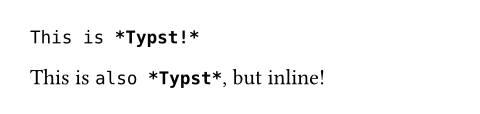
展开示例
```typ
This is *Typst!*
```
This is ```typ also *Typst*```, but inline!
align默认值:start
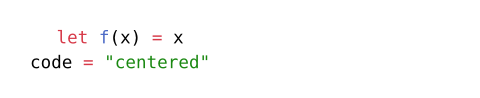
每个原始块中每行应具有的水平对齐方式。如果这不是原始块(如果指定 block: false 或标记模式中使用了单个反斜杠),则忽略此选项。
默认情况下,这设置为start,表示原始文本默认情况下沿块内文本方向对齐,而不管当前上下文的对其方式(例如,允许您在不居中块内文本的情况下居中原始块本身)。 [⚠️]
展开示例
#set raw(align: center)
```typc
let f(x) = x
code = "centered"
```
syntaxes默认值:()
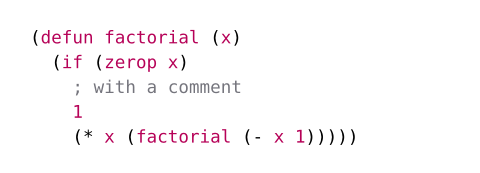
要加载的其他语法定义。语法定义应采用sublime-syntax文件格式。
您可以传递以下任何值:
- 一个路径字符串,从给定路径加载一个语法文件。有关路径的更多详细信息,请参阅路径部分。
- 原始字节,从中解码语法。
- 一个数组,其中每个项目是上述之一。
[⚠️💀]
展开示例
#set raw(syntaxes: "SExpressions.sublime-syntax")
```sexp
(defun factorial (x)
(if (zerop x)
; with a comment
1
(* x (factorial (- x 1)))))
```
theme默认值:auto
用于语法高亮的主题。主题应采用tmTheme文件格式。
您可以传递以下任何值:
none: 禁用语法高亮。auto: 使用Typst的默认主题。- 一个路径字符串,从给定路径加载一个主题文件。有关路径的更多详细信息,请参阅路径部分。
- 原始字节,从中解码主题。
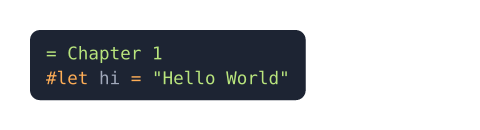
应用主题只会影响特定高亮文本的颜色。它不考虑主题的前景色和背景色属性,因此您可以控制原始文本的颜色。您可以使用text函数自己应用前景色,并使用填充块应用背景色。您还可以使用xml函数从主题中提取这些属性。 [⚠️]
展开示例
#set raw(theme: "halcyon.tmTheme")
#show raw: it => block(
fill: rgb("#1d2433"),
inset: 8pt,
radius: 5pt,
text(fill: rgb("#a2aabc"), it)
)
```typ
= Chapter 1
#let hi = "Hello World"
```
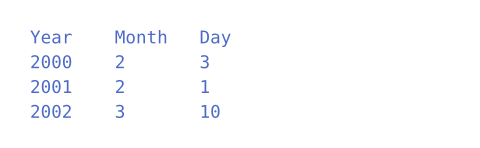
tab-size默认值:2
制表符停止的大小(以空格为单位)。制表符被替换为足够的空格,以与下一个倍数对齐。 [⚠️]
展开示例
#set raw(tab-size: 8)
```tsv
Year Month Day
2000 2 3
2001 2 1
2002 3 10
```
定义
line元素0.9.0起可用
高亮的原始文本。
这是一个由raw元素合成的辅助元素。
它允许您访问行的各种属性,例如行号、原始未高亮的文本、高亮的文本,以及它是否是原始块的第一行或最后一行。 [⚠️]
number
原始块中原始行的行号,从1开始。 [⚠️]
count
原始块中的总行数。 [⚠️]
text
原始文本行。 [⚠️]
body
高亮的原始文本。 [⚠️]