
0.3.0起可用
A filter for selecting elements within the document.
To construct a selector you can:
- use an element function
- filter for an element function with specific fields
- use a string or regular expression
- use a
<label> - use a
location - call the
selectorconstructor to convert any of the above types into a selector value and use the methods below to refine it
Selectors are used to apply styling rules to elements. You can also use selectors to query the document for certain types of elements.
Furthermore, you can pass a selector to several of Typst’s built-in functions to configure their behaviour. One such example is the outline where it can be used to change which elements are listed within the outline.
Multiple selectors can be combined using the methods shown below. However, not all kinds of selectors are supported in all places, at the moment.
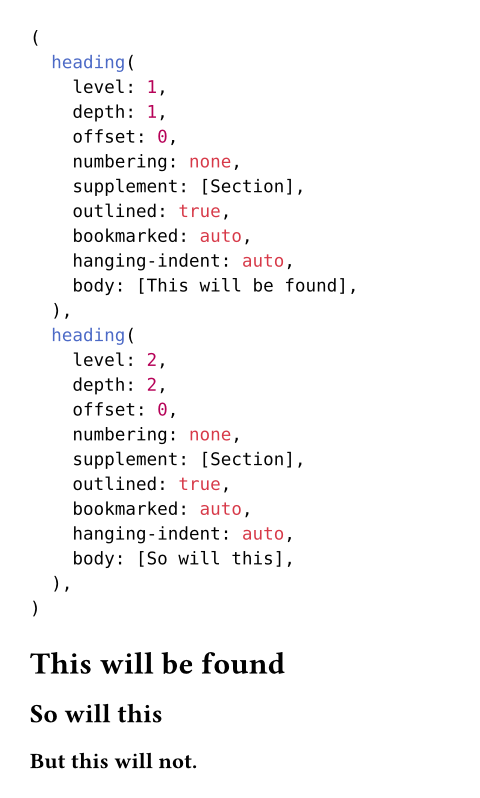
Example
#context query(
heading.where(level: 1)
.or(heading.where(level: 2))
)
= This will be found
== So will this
=== But this will not.
构造函数0.3.0起可用
Turns a value into a selector. The following values are accepted:
- An element function like a
headingorfigure. - A string or regular expression.
- A
<label>. - A
location. - A more complex selector like
heading.where(level: 1).
target
Can be an element function like a heading or figure, a <label> or a more complex selector like heading.where(level: 1).
定义
or0.3.0起可用
Selects all elements that match this or any of the other selectors.
others
The other selectors to match on.
and0.3.0起可用
Selects all elements that match this and all of the other selectors.
others
The other selectors to match on.
before0.3.0起可用
Returns a modified selector that will only match elements that occur before the first match of end.
Note: This selector is currently only supported with introspection functions, not in show rules.
end
The original selection will end at the first match of end.
inclusive默认值:true
Whether end itself should match or not. This is only relevant if both selectors match the same type of element. Defaults to true.
after0.3.0起可用
Returns a modified selector that will only match elements that occur after the first match of start.
Note: This selector is currently only supported with introspection functions, not in show rules.
start
The original selection will start at the first match of start.
inclusive默认值:true
Whether start itself should match or not. This is only relevant if both selectors match the same type of element. Defaults to true.
within0.15.0起可用
Returns a modified selector that will only match elements that are contained within any elements matching the ancestor selector.
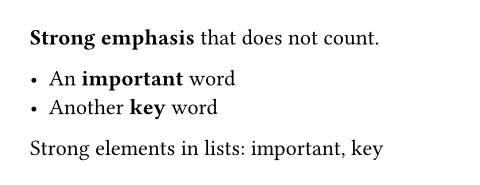
 展开示例:Finding strong elements in lists
*Strong emphasis* that does not count.
- An *important* word
- Another *key* word
Strong elements in lists:
#context {
query(selector(strong).within(list))
.map(it => it.body)
.join[, ]
}
This can also be used in combination with here to find all matches of a selector within a context expression. This can be quite useful to have an introspection return results local to some component you are building.
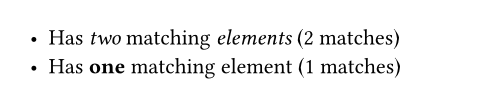
展开示例:Counting elements locally in a context block
#let count(sel, body) = context {
let n = query(selector(sel).within(here())).len()
[#body (#n matches)]
}
- #count(emph)[Has _two_ matching _elements_]
- #count(strong)[Has *one* matching element]
Note: This selector is currently only supported with introspection functions, not in show rules.
ancestor
Only matches of self that are descendants of any element matching this selector will be included in the output.
An element is not considered its own ancestor.