
int自始可用
An integer: a positive whole number, a negative whole number, or zero.
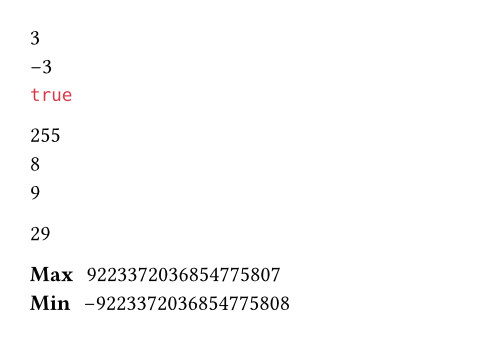
Typst stores signed integers with the two’s complement representation in 64 bits. This allows storing numbers up to or 9223372036854775807, and down to or -9223372036854775808. These values are accessible as int.max and int.min.
Integers can also be specified as hexadecimal, octal, or binary by starting with the prefixes: 0x, 0o, or 0b.
You can convert a value to an integer with this type’s constructor.
Example
#(1 + 2) \
#(2 - 5) \
#(3 + 4 < 8)
#0xff \
#0o10 \
#0b1001
#(int(3.8) + int("26"))
/ Max: #int.max
/ Min: #int.min
Syntax
Typst integers can be entered in code mode using the decimal digits 0–9. In addition, if a lone digit 0 is followed by x, o, or b (0x, 0o, 0b), Typst will treat following digits as a hexadecimal (base 16), octal (base 8), or binary (base 2) number.
Hexadecimal numbers use the letters a–f or A–F for the values 10–15.
Typst will error if an integer is written that is larger than int.max or smaller than int.min. If this happens, you may want to use a floating point number instead by appending a period to the end of the number.
Typst differs from some other programming languages by not treating negative integers as individual tokens in its syntax. Instead, input like -6 is treated as the negation operator applied to the positive integer 6. This may cause an issue when trying to write the minimum negative integer -9223372036854775808, as 9223372036854775808 is larger than int.max. To write the minimum negative integer, use int.min instead.
This also means that if you want to embed a negative integer in markup, you will need to use parentheses to group the negation operator: #(-6).
构造函数自始可用
Converts a value to an integer. Raises an error if there is an attempt to parse an invalid string or produce an integer that doesn’t fit into a 64-bit signed integer.
- Booleans are converted to
0or1. - Floats and decimals are rounded to the next 64-bit integer towards zero.
- Strings are parsed in base 10 by default.
 展开示例
展开示例
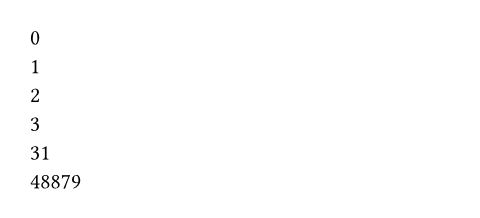
#int(false) \
#int(true) \
#int(2.7) \
#int(decimal("3.8")) \
#(int("27") + int("4")) \
#int("beef", base: 16)
value
The value that should be converted to an integer.
base默认值:10
The base (radix) for parsing strings, between 2 and 36.
Above base 10, Typst accepts the letters a–z or A–Z for the values 10–35.
定义
signum0.11.0起可用
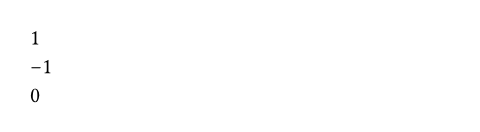
Calculates the sign of an integer.
- If the number is positive, returns
1. - If the number is negative, returns
-1. - If the number is zero, returns
0.
展开示例
#(5).signum() \
#(-5).signum() \
#(0).signum()
bit-not0.11.0起可用
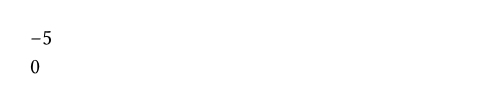
Calculates the bitwise NOT of an integer.
For the purposes of this function, the operand is treated as a signed integer of 64 bits.
展开示例
#4.bit-not() \
#(-1).bit-not()
bit-and0.11.0起可用
Calculates the bitwise AND between two integers.
For the purposes of this function, the operands are treated as signed integers of 64 bits.
展开示例
#128.bit-and(192)

rhs
The right-hand operand of the bitwise AND.
bit-or0.11.0起可用
Calculates the bitwise OR between two integers.
For the purposes of this function, the operands are treated as signed integers of 64 bits.
展开示例
#64.bit-or(32)

rhs
The right-hand operand of the bitwise OR.
bit-xor0.11.0起可用
Calculates the bitwise XOR between two integers.
For the purposes of this function, the operands are treated as signed integers of 64 bits.
展开示例
#64.bit-xor(96)

rhs
The right-hand operand of the bitwise XOR.
bit-lshift0.11.0起可用
Shifts the operand’s bits to the left by the specified amount.
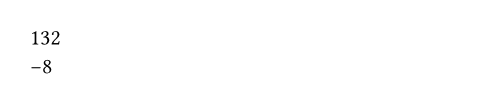
For the purposes of this function, the operand is treated as a signed integer of 64 bits. An error will occur if the result is too large to fit in a 64-bit integer.
展开示例
#33.bit-lshift(2) \
#(-1).bit-lshift(3)
shift
The amount of bits to shift. Must not be negative.
bit-rshift0.11.0起可用
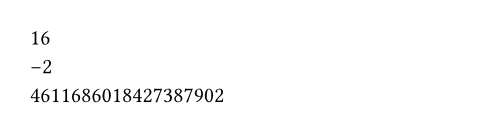
Shifts the operand’s bits to the right by the specified amount. Performs an arithmetic shift by default (extends the sign bit to the left, such that negative numbers stay negative), but that can be changed by the logical parameter.
For the purposes of this function, the operand is treated as a signed integer of 64 bits.
展开示例
#64.bit-rshift(2) \
#(-8).bit-rshift(2) \
#(-8).bit-rshift(2, logical: true)
shift
The amount of bits to shift. Must not be negative.
Shifts larger than 63 are allowed and will cause the return value to saturate. For non-negative numbers, the return value saturates at 0, while, for negative numbers, it saturates at -1 if logical is set to false, or 0 if it is true. This behavior is consistent with just applying this operation multiple times. Therefore, the shift will always succeed.
logical默认值:false
Toggles whether a logical (unsigned) right shift should be performed instead of arithmetic right shift. If this is true, negative operands will not preserve their sign bit, and bits which appear to the left after the shift will be 0. This parameter has no effect on non-negative operands.
from-bytes0.12.0起可用
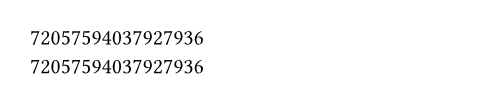
Converts bytes to an integer.
展开示例
#int.from-bytes(bytes((0, 0, 0, 0, 0, 0, 0, 1))) \
#int.from-bytes(bytes((1, 0, 0, 0, 0, 0, 0, 0)), endian: "big")
bytes
The bytes that should be converted to an integer.
Must be of length at most 8 so that the result fits into a 64-bit signed integer.
endian默认值:"little"
The endianness of the conversion.
| Variant | Details |
|---|---|
"big" | Big-endian byte order: The highest-value byte is at the beginning of the bytes. |
"little" | Little-endian byte order: The lowest-value byte is at the beginning of the bytes. |
signed默认值:true
Whether the bytes should be treated as a signed integer. If this is true and the most significant bit is set, the resulting number will negative.
to-bytes0.12.0起可用
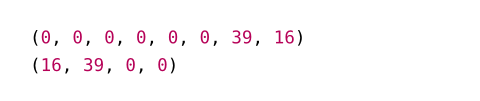
Converts an integer to bytes.
展开示例
#array(10000.to-bytes(endian: "big")) \
#array(10000.to-bytes(size: 4))
endian默认值:"little"
The endianness of the conversion.
| Variant | Details |
|---|---|
"big" | Big-endian byte order: The highest-value byte is at the beginning of the bytes. |
"little" | Little-endian byte order: The lowest-value byte is at the beginning of the bytes. |
size默认值:8
The size in bytes of the resulting bytes (must be at least zero). If the integer is too large to fit in the specified size, the conversion will truncate the remaining bytes based on the endianness. To keep the same resulting value, if the endianness is big-endian, the truncation will happen at the rightmost bytes. Otherwise, if the endianness is little-endian, the truncation will happen at the leftmost bytes.
Be aware that if the integer is negative and the size is not enough to make the number fit, when passing the resulting bytes to int.from-bytes, the resulting number might be positive, as the most significant bit might not be set to 1.