

data-cell0.14.0起可用Requires the a11y-extras feature
Explicitly defines this cell as a data cell.
Each cell in a table is either a header cell or a data cell. By default, all cells in table.header are header cells, and all other cells data cells.
If your header contains a cell that is not a header cell, you can use this function to mark it as a data cell.
The API of this feature is temporary. Hence, calling this function requires enabling the a11y-extras feature flag at the moment. In a future Typst release, this functionality may move out of the pdf module so that tables in other export targets can contain the same information.
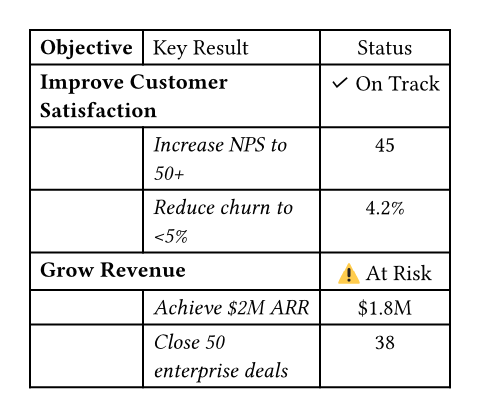
#show table.cell.where(x: 0): set text(weight: "bold")
#show table.cell.where(x: 1): set text(style: "italic")
#show table.cell.where(x: 1, y: 0): set text(style: "normal")
#table(
columns: 3,
align: (left, left, center),
table.header[Objective][Key Result][Status],
table.header(
level: 2,
table.cell(colspan: 2)[Improve Customer Satisfaction],
// Status is data for this objective, not a header
pdf.data-cell[✓ On Track],
),
[], [Increase NPS to 50+], [45],
[], [Reduce churn to \<5%], [4.2%],
table.header(
level: 2,
table.cell(colspan: 2)[Grow Revenue],
pdf.data-cell[⚠ At Risk],
),
[], [Achieve \$2M ARR], [\$1.8M],
[], [Close 50 enterprise deals], [38],
)
参数
cell
The table cell.
This can be content or a call to table.cell.