mat元素自始可用
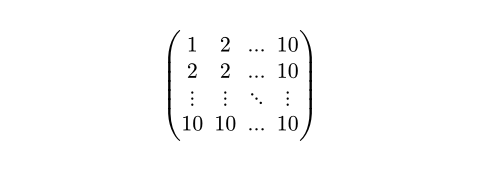
A matrix.
The elements of a row should be separated by commas, while the rows themselves should be separated by semicolons. The semicolon syntax merges preceding arguments separated by commas into an array. You can also use this special syntax of math function calls to define custom functions that take 2D data.
Content in cells can be aligned with the align parameter, or content in cells that are in the same row can be aligned with the & symbol.
Example
$ mat(
1, 2, ..., 10;
2, 2, ..., 10;
dots.v, dots.v, dots.down, dots.v;
10, 10, ..., 10;
) $
参数
delim默认值:("(", ")")
The delimiter to use.
Can be a single character specifying the left delimiter, in which case the right delimiter is inferred. Otherwise, can be an array containing a left and a right delimiter.
 展开示例
展开示例
#set math.mat(delim: "[")
$ mat(1, 2; 3, 4) $

align默认值:center
The horizontal alignment that each cell should have.
展开示例
#set math.mat(align: right)
$ mat(-1, 1, 1; 1, -1, 1; 1, 1, -1) $

augment默认值:none
Draws augmentation lines in a matrix.
none: No lines are drawn.- A single number: A vertical augmentation line is drawn after the specified column number. Negative numbers start from the end.
A dictionary: With a dictionary, multiple augmentation lines can be drawn both horizontally and vertically. Additionally, the style of the lines can be set. The dictionary can contain the following keys:
hline: The offsets at which horizontal lines should be drawn. For example, an offset of2would result in a horizontal line being drawn after the second row of the matrix. Accepts either an integer for a single line, or an array of integers for multiple lines. Like for a single number, negative numbers start from the end.vline: The offsets at which vertical lines should be drawn. For example, an offset of2would result in a vertical line being drawn after the second column of the matrix. Accepts either an integer for a single line, or an array of integers for multiple lines. Like for a single number, negative numbers start from the end.stroke: How to stroke the line. If set toauto, takes on a thickness of 0.05 em and square line caps.
展开示例:Basic usage
$ mat(1, 0, 1; 0, 1, 2; augment: #2) $
// Equivalent to:
$ mat(1, 0, 1; 0, 1, 2; augment: #(-1)) $

展开示例:Customizing the augmentation line
$ mat(0, 0, 0; 1, 1, 1; augment: #(hline: 1, stroke: 2pt + green)) $

gap默认值:0% + 0pt
The gap between rows and columns.
This is a shorthand to set row-gap and column-gap to the same value.
展开示例
#set math.mat(gap: 1em)
$ mat(1, 2; 3, 4) $

row-gap默认值:0% + 0.2em
The gap between rows.
展开示例
#set math.mat(row-gap: 1em)
$ mat(1, 2; 3, 4) $

column-gap默认值:0% + 0.5em
The gap between columns.
展开示例
#set math.mat(column-gap: 1em)
$ mat(1, 2; 3, 4) $

rows
An array of arrays with the rows of the matrix.
展开示例
#let data = ((1, 2, 3), (4, 5, 6))
#let matrix = math.mat(..data)
$ v := matrix $