
scale元素自始可用
Scales content without affecting layout.
Lets you mirror content by specifying a negative scale on a single axis.
Example
#set align(center)
#scale(x: -100%)[This is mirrored.]
#scale(x: -100%, reflow: true)[This is mirrored.]

参数
scale(
factor: autolengthratio,x: autolengthratio,y: autolengthratio,origin: alignment,reflow: bool,content,
) → contentfactor默认值:100%
The scaling factor for both axes, as a positional argument. This is just an optional shorthand notation for setting x and y to the same value.
x默认值:100%
The horizontal scaling factor.
The body will be mirrored horizontally if the parameter is negative.
y默认值:100%
The vertical scaling factor.
The body will be mirrored vertically if the parameter is negative.
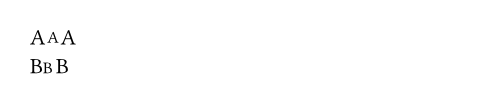
origin默认值:center + horizon
The origin of the transformation.
 展开示例
展开示例
A#box(scale(75%)[A])A \
B#box(scale(75%, origin: bottom + left)[B])B
reflow默认值:false
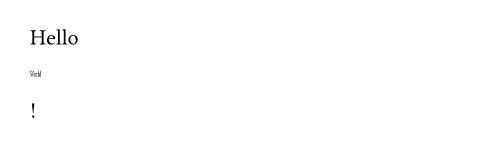
Whether the scaling impacts the layout.
If set to false, the scaled content will be allowed to overlap other content. If set to true, it will compute the new size of the scaled content and adjust the layout accordingly.
展开示例
Hello #scale(x: 20%, y: 40%, reflow: true)[World]!
body
The content to scale.