
strike元素自始可用
Strikes through text.
Example
This is #strike[not] relevant.

参数
strike(
stroke: autolengthcolorgradientstroketilingdictionary,offset: autolength,extent: length,background: bool,content,
) → contentstroke默认值:auto
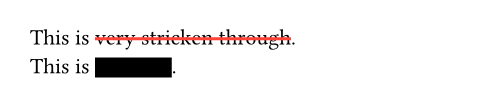
How to stroke the line.
If set to auto, takes on the text’s color and a thickness defined in the current font.
Note: Please don’t use this for real redaction as you can still copy paste the text.
 展开示例
展开示例
This is #strike(stroke: 1.5pt + red)[very stricken through]. \
This is #strike(stroke: 10pt)[redacted].
offset默认值:auto
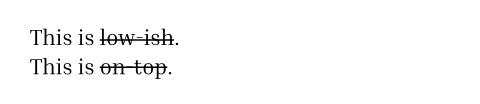
The position of the line relative to the baseline. Read from the font tables if auto.
This is useful if you are unhappy with the offset your font provides.
展开示例
#set text(font: "Inria Serif")
This is #strike(offset: auto)[low-ish]. \
This is #strike(offset: -3.5pt)[on-top].
extent默认值:0pt
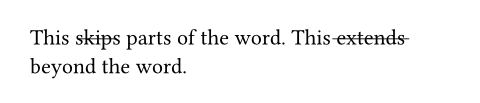
The amount by which to extend the line beyond (or within if negative) the content.
展开示例
This #strike(extent: -2pt)[skips] parts of the word.
This #strike(extent: 2pt)[extends] beyond the word.
background默认值:false
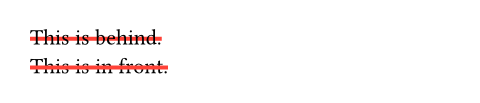
Whether the line is placed behind the content.
展开示例
#set strike(stroke: red + 2pt)
#strike(background: true)[This is behind.] \
#strike(background: false)[This is in front.]
body
The content to strike through.