
skew元素0.12.0起可用
Skews content.
Skews an element in horizontal and/or vertical direction. The layout will act as if the element was not skewed unless you specify reflow: true.
Example
#skew(ax: -12deg)[
This is some fake italic text.
]

参数
ax默认值:0deg
The horizontal skewing angle.
 展开示例
展开示例
#skew(ax: 30deg)[Skewed]

ay默认值:0deg
The vertical skewing angle.
展开示例
#skew(ay: 30deg)[Skewed]

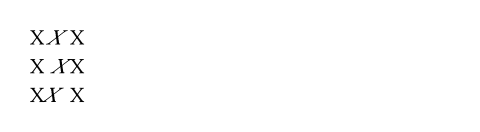
origin默认值:center + horizon
The origin of the skew transformation.
The origin will stay fixed during the operation.
展开示例
X #box(skew(ax: -30deg, origin: center + horizon)[X]) X \
X #box(skew(ax: -30deg, origin: bottom + left)[X]) X \
X #box(skew(ax: -30deg, origin: top + right)[X]) X
reflow默认值:false
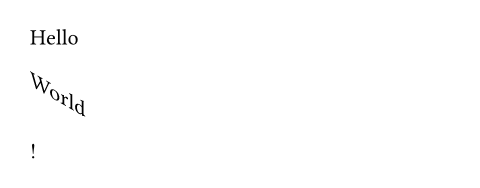
Whether the skew transformation impacts the layout.
If set to false, the skewed content will retain the bounding box of the original content. If set to true, the bounding box will take the transformation of the content into account and adjust the layout accordingly.
展开示例
Hello #skew(ay: 30deg, reflow: true, "World")!
body
The content to skew.