

数学 [⚠️ need proofread]
Typst has special syntax and library functions to typeset mathematical formulas. Math formulas can be displayed inline with text or as separate blocks. They will be typeset into their own block if they start and end with at least one space (e.g. $ x^2 $).
Variables
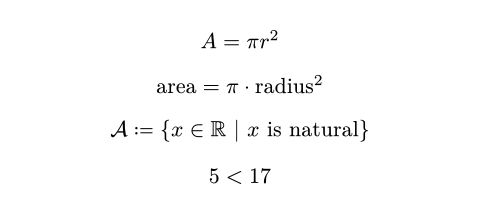
In math, single letters are always displayed as is. Multiple letters, however, are interpreted as variables and functions. To display multiple letters verbatim, you can place them into quotes and to access single letter variables, you can use the hash syntax.
$ A = pi r^2 $
$ "area" = pi dot "radius"^2 $
$ cal(A) :=
{ x in RR | x "is natural" } $
#let x = 5
$ #x < 17 $
Symbols
Math mode makes a wide selection of symbols like pi, dot, or RR available. Many mathematical symbols are available in different variants. You can select between different variants by applying modifiers to the symbol. Typst further recognizes a number of shorthand sequences like => that approximate a symbol. When such a shorthand exists, the symbol’s documentation lists it.
$ x < y => x gt.eq.not y $

Line Breaks
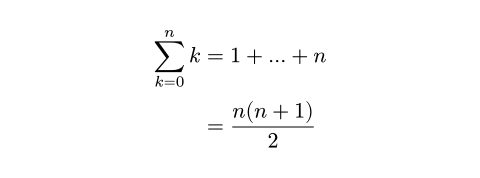
Formulas can also contain line breaks. Each line can contain one or multiple alignment points (&) which are then aligned.
$ sum_(k=0)^n k
&= 1 + ... + n \
&= (n(n+1)) / 2 $
Function calls
Math mode supports special function calls without the hash prefix. In these “math calls”, the argument list works a little differently than in code:
- Within them, Typst is still in “math mode”. Thus, you can write math directly into them, but need to use hash syntax to pass code expressions (except for strings, which are available in the math syntax).
- They support positional and named arguments, as well as argument spreading, but don’t support trailing content blocks.
- They provide additional syntax for 2-dimensional argument lists. The semicolon (
;) merges preceding arguments separated by commas into an array argument.
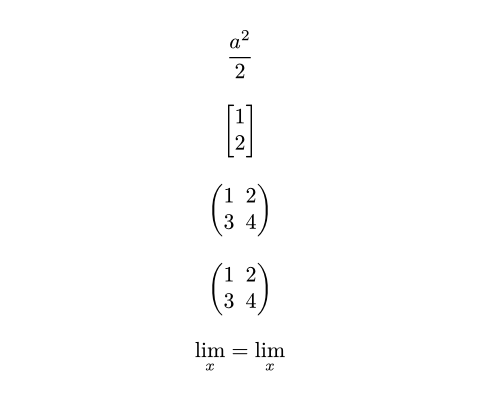
$ frac(a^2, 2) $
$ vec(1, 2, delim: "[") $
$ mat(1, 2; 3, 4) $
$ mat(..#range(1, 5).chunks(2)) $
$ lim_x =
op("lim", limits: #true)_x $
To write a verbatim comma or semicolon in a math call, escape it with a backslash. The colon on the other hand is only recognized in a special way if directly preceded by an identifier, so to display it verbatim in those cases, you can just insert a space before it.
Functions calls preceded by a hash are normal code function calls and not affected by these rules.
Alignment
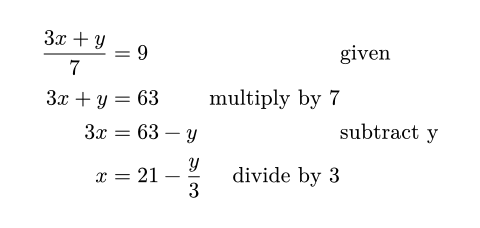
When equations include multiple alignment points (&), this creates blocks of alternatingly right- and left-aligned columns. In the example below, the expression (3x + y) / 7 is right-aligned and = 9 is left-aligned. The word “given” is also left-aligned because && creates two alignment points in a row, alternating the alignment twice. & & and && behave exactly the same way. Meanwhile, “multiply by 7” is right-aligned because just one & precedes it. Each alignment point simply alternates between right-aligned/left-aligned.
$ (3x + y) / 7 &= 9 && "given" \
3x + y &= 63 & "multiply by 7" \
3x &= 63 - y && "subtract y" \
x &= 21 - y/3 & "divide by 3" $
Math fonts
You can set the math font with a show-set rule as demonstrated below. Note that only special OpenType math fonts are suitable for typesetting maths.
#show math.equation: set text(font: "Pennstander Math")
$ sum_(i in NN) 1 + i $

Math module
All math functions are part of the math module, which is available by default in equations. Outside of equations, they can be accessed with the math. prefix.
Accessibility
To make math accessible, you must provide alternative descriptions of equations in natural language using the alt parameter of math.equation. For more information, see the Textual Representations section of the Accessibility Guide.
#math.equation(
alt: "d S equals delta q divided by T",
block: true,
$ dif S = (delta q) / T $,
)

In the future, Typst will automatically make equations without alternative descriptions accessible in HTML and PDF 2.0 export.
定义
accentAttaches an accent to a base.- attach
下标、上标和限制。
附件可以显示为上/下标或限制。Typst会根据基数自动决定哪个更适合,但您还可以使用
scripts和limits函数手动控制。 [⚠️💀] binomA binomial expression.cancelDisplays a diagonal line over a part of an equation.casesA case distinction.classForced use of a certain math class.equationA mathematical equation.fracA mathematical fraction.- lr
定界符匹配。
lr函数允许您匹配两个定界符并按其包含的内容缩放它们。虽然在语法上匹配的定界符也会自动进行,但lr允许您匹配两个任意的定界符并精确控制它们的大小。除了lr函数外,Typst还提供了一些创建绝对值、上取整和下取整值以及范数的定界符配对的其他函数。 [⚠️] matA matrix.opA text operator in an equation.primesGrouped primes.- roots平方根和非平方根。 [⚠️]
- sizes强制公式中表达式的大小样式。
stretchStretches a glyph.- styles公式中的备用字形。
- underover方程的部分上方或下方的定界符。
- variants公式中的备用字体。
vecA column vector.