
datetime0.5.0起可用
Represents a date, a time, or a combination of both.
Can be created by either specifying a custom datetime using this type’s constructor function or getting the current date with datetime.today.
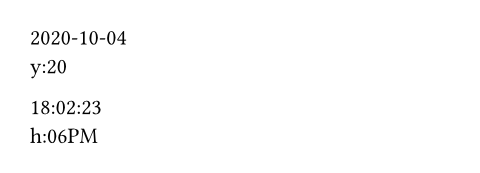
Example
#let date = datetime(
year: 2020,
month: 10,
day: 4,
)
#date.display() \
#date.display(
"y:[year repr:last_two]"
)
#let time = datetime(
hour: 18,
minute: 2,
second: 23,
)
#time.display() \
#time.display(
"h:[hour repr:12][period]"
)
Datetime and Duration
You can get a duration by subtracting two datetime:
#let first-of-march = datetime(day: 1, month: 3, year: 2024)
#let first-of-jan = datetime(day: 1, month: 1, year: 2024)
#let distance = first-of-march - first-of-jan
#distance.hours()

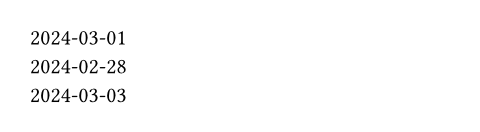
You can also add/subtract a datetime and a duration to retrieve a new, offset datetime:
#let date = datetime(day: 1, month: 3, year: 2024)
#let two-days = duration(days: 2)
#let two-days-earlier = date - two-days
#let two-days-later = date + two-days
#date.display() \
#two-days-earlier.display() \
#two-days-later.display()
Format
You can specify a customized formatting using the display method. The format of a datetime is specified by providing components with a specified number of modifiers. A component represents a certain part of the datetime that you want to display, and with the help of modifiers you can define how you want to display that component. In order to display a component, you wrap the name of the component in square brackets (e.g. [year] will display the year). In order to add modifiers, you add a space after the component name followed by the name of the modifier, a colon and the value of the modifier (e.g. [month repr:short] will display the short representation of the month).
The possible combination of components and their respective modifiers is as follows:
year: Displays the year of the datetime.base: Can be eithercalendaroriso_week. Specifies whether the year is based on the Gregorian calendar or the ISO week number.padding: Can be eitherzero,spaceornone. Specifies how the year is padded.reprCan be eitherfullin which case the full year is displayed orlast_twoin which case only the last two digits are displayed.sign: Can be eitherautomaticormandatory. Specifies when the sign should be displayed.
month: Displays the month of the datetime.padding: Can be eitherzero,spaceornone. Specifies how the month is padded.repr: Can be eithernumerical,longorshort. Specifies if the month should be displayed as a number or a word. Unfortunately, when choosing the word representation, it can currently only display the English version. In the future, it is planned to support localization.
day: Displays the day of the datetime.padding: Can be eitherzero,spaceornone. Specifies how the day is padded.
week_number: Displays the week number of the datetime.padding: Can be eitherzero,spaceornone. Specifies how the week number is padded.repr: Can be eitherISO,sundayormonday. In the case ofISO, week numbers are between 1 and 53, while the other ones are between 0 and 53.
weekday: Displays the weekday of the date.reprCan be eitherlong,short,sundayormonday. In the case oflongandshort, the corresponding English name will be displayed (same as for the month, other languages are currently not supported). In the case ofsundayandmonday, the numerical value will be displayed (assuming Sunday and Monday as the first day of the week, respectively).one_indexed: Can be eithertrueorfalse. Defines whether the numerical representation of the week starts with 0 or 1.
hour: Displays the hour of the date.padding: Can be eitherzero,spaceornone. Specifies how the hour is padded.repr: Can be either24or12. Changes whether the hour is displayed in the 24-hour or 12-hour format.
period: The AM/PM part of the hourcase: Can belowerto display it in lower case andupperto display it in upper case.
minute: Displays the minute of the date.padding: Can be eitherzero,spaceornone. Specifies how the minute is padded.
second: Displays the second of the date.padding: Can be eitherzero,spaceornone. Specifies how the second is padded.
See here for more details on the supported syntax.
Keep in mind that not always all components can be used. For example, if you create a new datetime with datetime(year: 2023, month: 10, day: 13), it will be stored as a plain date internally, meaning that you cannot use components such as hour or minute, which would only work on datetimes that have a specified time.
构造函数0.5.0起可用
Creates a new datetime.
You can specify the datetime using a year, month, day, hour, minute, and second.
Note: Depending on which components of the datetime you specify, Typst will store it in one of the following three ways:
- If you specify year, month and day, Typst will store just a date.
- If you specify hour, minute and second, Typst will store just a time.
- If you specify all of year, month, day, hour, minute and second, Typst will store a full datetime.
Depending on how it is stored, the display method will choose a different formatting by default.
 展开示例
展开示例
#datetime(
year: 2012,
month: 8,
day: 3,
).display()

year
The year of the datetime.
month
The month of the datetime.
day
The day of the datetime.
hour
The hour of the datetime.
minute
The minute of the datetime.
second
The second of the datetime.
定义
today0.5.0起可用
Returns the current date.
In the CLI, this can be overridden with the --creation-timestamp argument or by setting the SOURCE_DATE_EPOCH environment variable. In both cases, the value should be given as a UNIX timestamp.
展开示例
Today's date is
#datetime.today().display().

offset默认值:auto
An offset to apply to the current UTC date. If set to auto, the offset will be the local offset.
When an integer offset is given, it will be treated as a duration in hours.
display0.5.0起可用
Displays the datetime in a specified format.
Depending on whether you have defined just a date, a time or both, the default format will be different. If you specified a date, it will be [year]-[month]-[day]. If you specified a time, it will be [hour]:[minute]:[second]. In the case of a datetime, it will be [year]-[month]-[day] [hour]:[minute]:[second].
See the format syntax for more information.
pattern默认值:auto
The format used to display the datetime.
year0.5.0起可用
The year if it was specified, or none for times without a date.
month0.5.0起可用
The month if it was specified, or none for times without a date.
weekday0.5.0起可用
The weekday (counting Monday as 1) or none for times without a date.
day0.5.0起可用
The day if it was specified, or none for times without a date.
hour0.5.0起可用
The hour if it was specified, or none for dates without a time.
minute0.5.0起可用
The minute if it was specified, or none for dates without a time.
second0.5.0起可用
The second if it was specified, or none for dates without a time.
ordinal0.5.0起可用
The ordinal (day of the year), or none for times without a date.