
heading元素自始可用
A section heading.
With headings, you can structure your document into sections. Each heading has a level, which starts at one and is unbounded upwards. This level indicates the logical role of the following content (section, subsection, etc.) A top-level heading indicates a top-level section of the document (not the document’s title). To insert a title, use the title element instead.
Typst can automatically number your headings for you. To enable numbering, specify how you want your headings to be numbered with a numbering pattern or function.
Independently of the numbering, Typst can also automatically generate an outline of all headings for you. To exclude one or more headings from this outline, you can set the outlined parameter to false.
When writing a show rule that accesses the body field to create a completely custom look for headings, make sure to wrap the content in a block (which is implicitly sticky for headings through a built-in show-set rule). This prevents headings from becoming “orphans”, i.e. remaining at the end of the page with the following content being on the next page.
Example
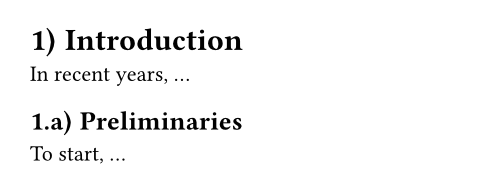
#set heading(numbering: "1.a)")
= Introduction
In recent years, ...
== Preliminaries
To start, ...
Syntax
Headings have dedicated syntax: They can be created by starting a line with one or multiple equals signs, followed by a space. The number of equals signs determines the heading’s logical nesting depth. The offset field can be set to configure the starting depth.
Accessibility
Headings are important for accessibility, as they help users of Assistive Technologies (AT) like screen readers to navigate within your document. Screen reader users will be able to skip from heading to heading, or get an overview of all headings in the document.
To make your headings accessible, you should not skip heading levels. This means that you should start with a first-level heading. Also, when the previous heading was of level 3, the next heading should be of level 3 (staying at the same depth), level 4 (going exactly one level deeper), or level 1 or 2 (new hierarchically higher headings).
HTML export
As mentioned above, a top-level heading indicates a top-level section of the document rather than its title. This is in contrast to the HTML <h1> element of which there should be only one per document.
For this reason, in HTML export, a title element will turn into an <h1> and headings turn into <h2> and lower (a level 1 heading thus turns into <h2>, a level 2 heading into <h3>, etc).
参数
level默认值:auto
The absolute nesting depth of the heading, starting from one. If set to auto, it is computed from offset + depth.
This is primarily useful for usage in show rules (either with where selectors or by accessing the level directly on a shown heading).
 展开示例
展开示例
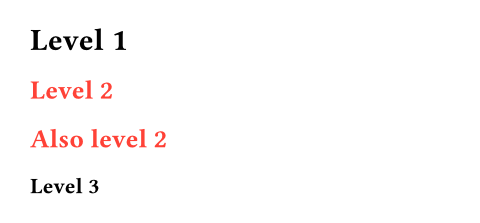
#show heading.where(level: 2): set text(red)
= Level 1
== Level 2
#set heading(offset: 1)
= Also level 2
== Level 3
depth默认值:1
The relative nesting depth of the heading, starting from one. This is combined with offset to compute the actual level.
This is set by the heading syntax, such that == Heading creates a heading with logical depth of 2, but actual level offset + 2. If you construct a heading manually, you should typically prefer this over setting the absolute level.
offset默认值:0
The starting offset of each heading’s level, used to turn its relative depth into its absolute level.
展开示例
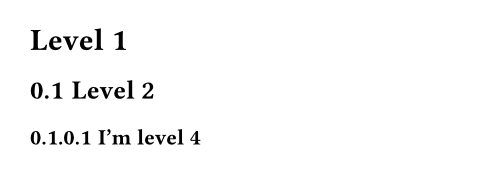
= Level 1
#set heading(offset: 1, numbering: "1.1")
= Level 2
#heading(offset: 2, depth: 2)[
I'm level 4
]
numbering默认值:none
How to number the heading. Accepts a numbering pattern or function taking multiple numbers.
展开示例
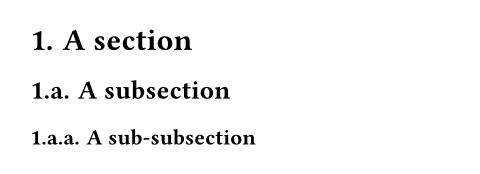
#set heading(numbering: "1.a.")
= A section
== A subsection
=== A sub-subsection
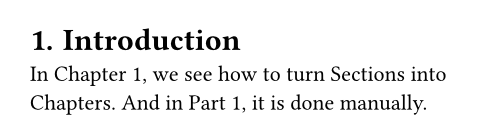
supplement默认值:auto
A supplement for the heading.
For references to headings, this is added before the referenced number.
If a function is specified, it is passed the referenced heading and should return content.
展开示例
#set heading(numbering: "1.", supplement: [Chapter])
= Introduction <intro>
In @intro, we see how to turn
Sections into Chapters. And
in @intro[Part], it is done
manually.
outlined默认值:true
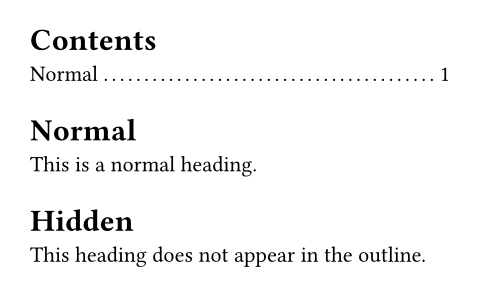
Whether the heading should appear in the outline.
Note that this property, if set to true, ensures the heading is also shown as a bookmark in the exported PDF’s outline (when exporting to PDF). To change that behavior, use the bookmarked property.
展开示例
#outline()
#heading[Normal]
This is a normal heading.
#heading(outlined: false)[Hidden]
This heading does not appear
in the outline.
bookmarked默认值:auto
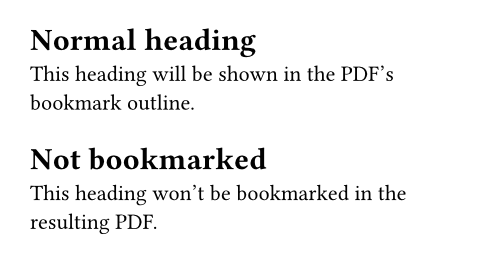
Whether the heading should appear as a bookmark in the exported PDF’s outline. Doesn’t affect other export formats, such as PNG.
The default value of auto indicates that the heading will only appear in the exported PDF’s outline if its outlined property is set to true, that is, if it would also be listed in Typst’s outline. Setting this property to either true (bookmark) or false (don’t bookmark) bypasses that behavior.
展开示例
#heading[Normal heading]
This heading will be shown in
the PDF's bookmark outline.
#heading(bookmarked: false)[Not bookmarked]
This heading won't be
bookmarked in the resulting
PDF.
hanging-indent默认值:auto
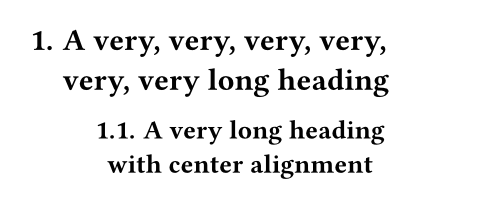
The indent all but the first line of a heading should have.
The default value of auto uses the width of the numbering as indent if the heading is aligned at the start of the text direction, and no indent for center and other alignments.
展开示例
#set heading(numbering: "1.")
= A very, very, very, very, very, very long heading
#show heading: set align(center)
== A very long heading\ with center alignment
body
The heading’s title.